Most ThriveCart reviews online fall into one of two camps: breathless affiliate posts that make it sound like a magic money machine, or shallow comparisons that barely scratch the surface.
This isn’t either of those.
This review digs into what ThriveCart actually does, where it genuinely excels, where it falls short, and — most importantly — whether it’s worth your money. It’s built on hundreds of verified user reviews from Capterra and G2, real pricing data, and a thorough breakdown of every feature that matters.
No hype. No hidden agenda. Just the clearest picture we can give you so you can make the right call for your business.
Quick Scorecard — ThriveCart at a Glance
Before we go deep, here’s how ThriveCart stacks up across the things that actually matter:
| Category | Rating | Quick Take |
| Ease of Use | ★★★★★ | Genuinely beginner-friendly |
| Checkout Design | ★★★★☆ | Good, not the flashiest |
| Value for Money | ★★★★★ | Unmatched at $495 lifetime |
| Affiliate Tools | ★★★★☆ | Best-in-class for the price |
| Analytics | ★★★★☆ | Solid, Pro+ adds more depth |
| Customer Support | ★★★☆☆ | Ticket-based, 1–3 day waits |
| Template Library | ★★★☆☆ | Functional but limited |
| Course Platform | ★★★☆☆ | Good for basics, not a full LMS |
| Integrations | ★★★★★ | Connects with everything |
| Overall | ★★★★☆ | Strong buy for digital sellers |
| Overall Verdict ThriveCart earns a solid 4.2/5. It does what it promises — beautifully. If you sell digital products, courses, or services and you’re tired of paying monthly checkout fees, it’s one of the smartest investments you’ll make in your business this year. |
What Is ThriveCart, Really?
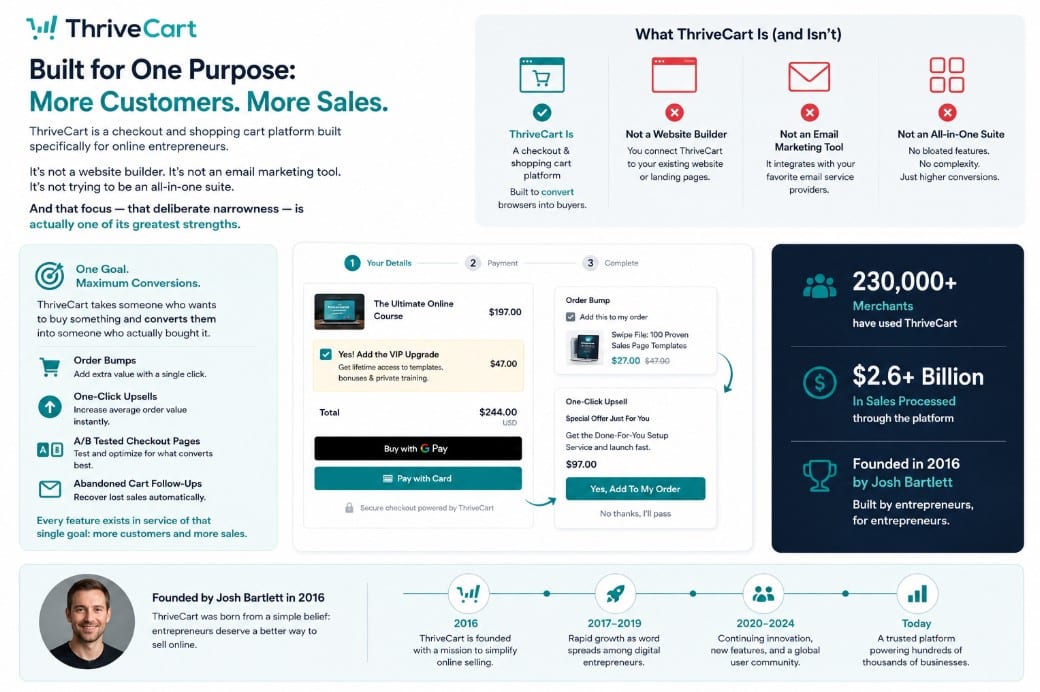
ThriveCart is a checkout and shopping cart platform built specifically for online entrepreneurs. It is not a website builder. It is not an email marketing tool. It is not trying to be an all-in-one suite. And that focus — that deliberate narrowness — is actually one of its greatest strengths.
It does one thing: it takes someone who wants to buy something and converts them into someone who actually bought it. Order bumps. One-click upsells. A/B-tested checkout pages. Abandoned cart follow-ups. Every feature exists in service of that single goal.
ThriveCart was founded by Josh Bartlett in 2016. Since then, it has quietly become one of the most respected checkout tools in the creator economy. Over 230,000 merchants have used it to process more than $2.6 billion in sales. Those aren’t vanity numbers — they’re a signal that the tool actually works.
Getting Started: What the Onboarding Actually Looks Like
The setup experience is one area where ThriveCart consistently earns praise from new users — and it’s worth understanding why.
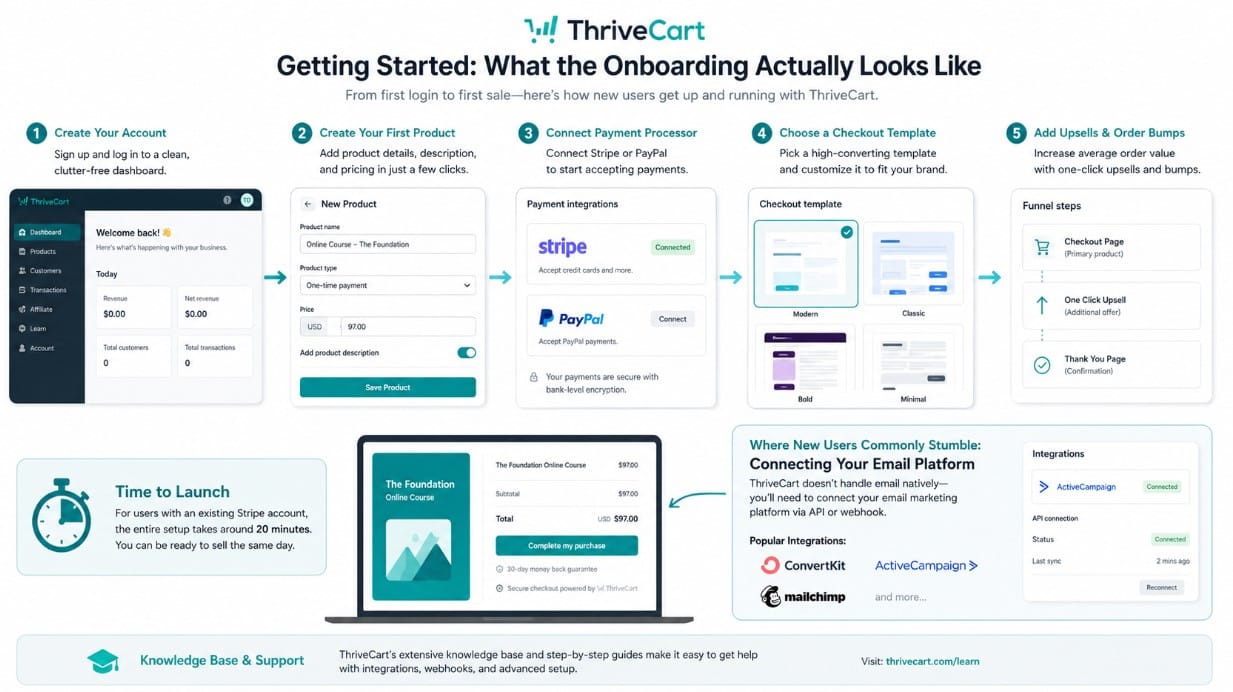
When you first log in, the dashboard is clean. Almost surprisingly clean for a tool with this many features. Users create their first product, set a price, connect their payment processor (Stripe or PayPal), and are ready to sell. According to multiple user reports, the whole setup takes around 20 minutes for someone who already has a Stripe account connected.
Product setup is straightforward — you choose a pricing type (one-time, subscription, split-pay, or pay-what-you-want), select a checkout template, then layer in upsells and order bumps. The workflow is logical and doesn’t demand technical knowledge.
Where new users most commonly stumble is connecting their email marketing platform. ThriveCart doesn’t handle email natively — it needs to be linked to ConvertKit, ActiveCampaign, Mailchimp, or another provider. The integrations work reliably, but users who have never configured a webhook or API connection may need to set aside some time and lean on the knowledge base.
| Setup Reality Check Comfortable with basic tech: Most users report being ready to sell in under an hour. Less tech-savvy: Budget a weekend. The knowledge base and ThriveCart’s Facebook community are both genuinely useful resources. |
The Features That Actually Move the Needle
1. Order Bumps and Upsells — ThriveCart’s Best-in-Class Feature
This is where ThriveCart earns its reputation. An order bump is an add-on offer shown on the checkout page itself — before the customer completes the purchase. A one-click upsell triggers after the sale.
Standard users get order bumps on every product. Pro+ users can stack up to six order bumps on a single checkout, which ThriveCart reports can boost average order value by up to 19%. In practice, even a single well-placed order bump — a complementary template, a quick-start guide, an extended warranty — adds meaningful revenue without any extra ad spend.
The setup is visual and fast. You’re not writing code. You pick the product, set the price, write a short pitch, and it’s live.
| “ThriveCart is aimed at increasing conversions and order value with many payment gateways and upsells, downsells, and bumps. It’s great value for a one-time price.” — Geoffrey J., Founder — G2 verified review |
2. A/B Testing — Standard on Every Plan

Most platforms charge a premium for A/B testing. ThriveCart includes it on every plan.
You select the element you want to test — headline, price, button color, template layout — set a duration, and ThriveCart runs the experiment automatically. When it’s done, it tells you which version won. You accept the winner, move on.
For online sellers, this is huge. The difference between a 2% and a 4% checkout conversion rate on a product doing $10,000/month is an extra $100,000 in annual revenue. A/B testing is how you find that difference, and ThriveCart makes it genuinely accessible.
3. Affiliate Management — Better Than Tools Costing 5x More
ThriveCart’s affiliate center is one of the most capable you’ll find outside of dedicated affiliate platforms — and it’s built in.
You can create a custom affiliate signup page, set commission structures (flat fee or percentage), approve affiliates manually or automatically, create tiered commissions for top performers, and import affiliates from other platforms. As of 2025, ThriveCart added deep linking, meaning affiliates can drive traffic to specific product or landing pages rather than just your homepage.
If you sell in a market where word-of-mouth and partner promotion matter — courses, software, digital products — this feature alone could pay back your ThriveCart investment within a few months.
4. The Drag-and-Drop Editor (New and Genuinely Good)
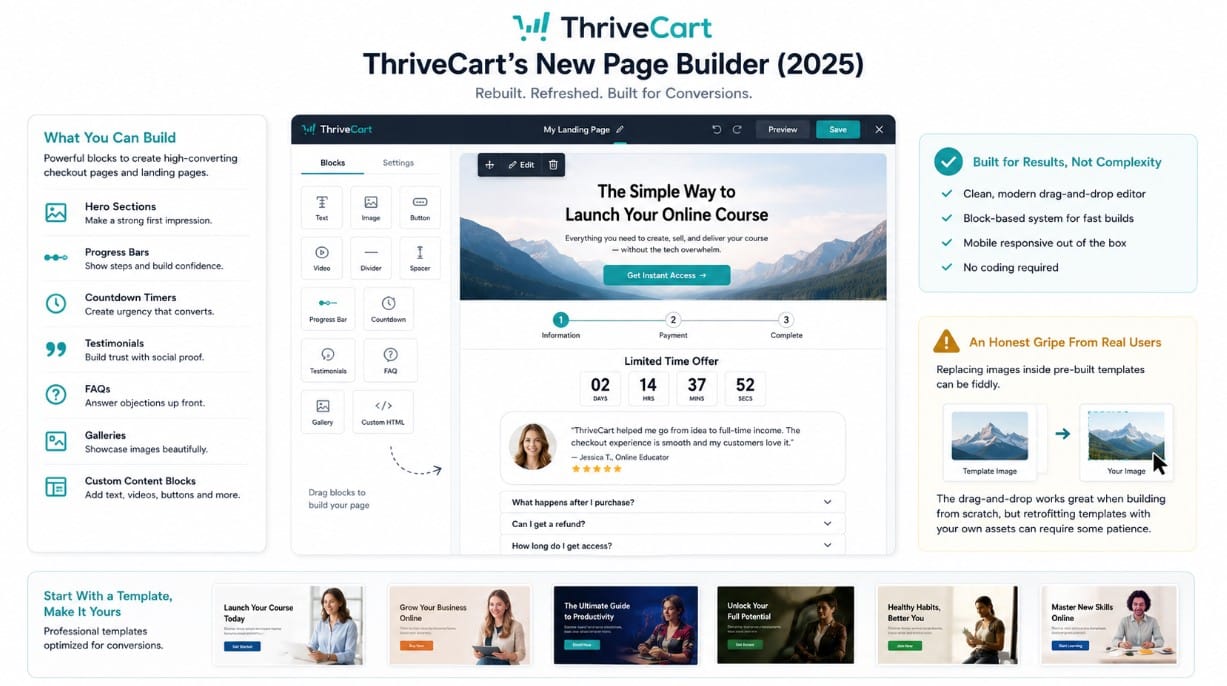
ThriveCart’s page builder was a weak point for years. In 2025, they rebuilt it. The new drag-and-drop editor is clean and flexible, using a block-based system with progress bars, hero areas, countdown timers, testimonials, FAQs, galleries, and custom content blocks.
Is it as powerful as a dedicated page builder like Elementor or Unbounce? No. But for checkout pages and simple landing pages, it does the job — and it does it without requiring any coding knowledge.
One honest gripe from real users: replacing images inside pre-built templates can be fiddly. The drag-and-drop works well when you’re building fresh, but retrofitting someone else’s design with your own assets can require some patience.
5. Analytics and Revenue Forecasting
The analytics dashboard covers live traffic, individual product conversion rates, refund rates, average revenue per visitor, and net revenue. What makes it more than a vanity dashboard is the intelligent revenue forecasting — ThriveCart learns from your data over time and produces projections that get more accurate as you feed it more transactions.
Pro+ adds UTM tracking, funnel comparisons, coupon performance insights, and bulk invoice exports. If you’re running paid traffic or managing multiple products, that upgrade adds real analytical depth.
6. Integrations — Connects with Almost Everything
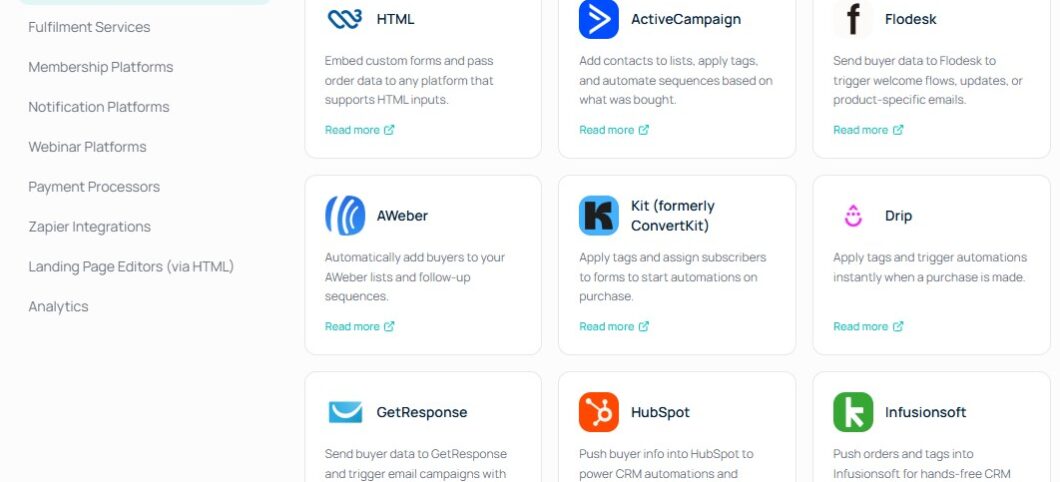
This is where ThriveCart genuinely shines for intermediate to advanced users. Native integrations include:
- Email: ActiveCampaign, ConvertKit, AWeber, MailChimp, Drip, Mailerlite, GetResponse, HubSpot, Infusionsoft
- Membership and Courses: Kajabi, Teachable, MemberPress, AccessAlly, Thinkific
- Automation: Zapier (3,000+ apps), SureTriggers
- Fulfillment: Shippo, Lulu, Kunaki, Printful
- Other: Slack, Google Sheets, ClickFunnels, ThriveArchitect
ThriveCart acts as the payment and checkout layer that sits on top of an existing tech stack. For entrepreneurs who already have tools they love, ThriveCart plugs into them rather than forcing a platform switch.
The Parts Nobody Talks About (The Honest Bits)
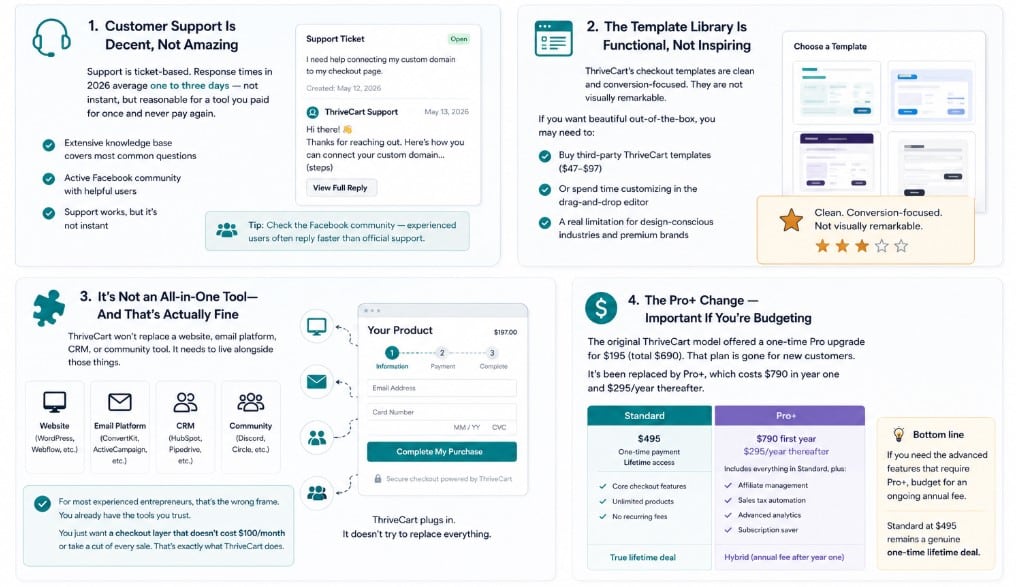
Customer Support Is Decent, Not Amazing
Support is ticket-based. Response times average one to three days — not instant, but reasonable for a tool you paid for once and never pay again. The knowledge base covers most common questions, and there’s an active Facebook community where experienced users often answer questions faster than official support.
If you’re used to live chat support from premium monthly SaaS tools, adjust your expectations. ThriveCart support works, but it’s not instant.
The Template Library Is Functional, Not Inspiring
ThriveCart’s checkout templates are clean and conversion-focused. They are not visually remarkable. If you want beautiful out-of-the-box, you may find yourself reaching for third-party ThriveCart templates (several designers sell packs for $47–$97) or spending time in the drag-and-drop editor building something custom.
This is a real limitation, especially if you’re in a design-conscious market like wedding photography, high-end coaching, or fashion. Your checkout page does reflect on your brand — and ThriveCart’s defaults are bland enough that you’ll want to customize them.
It’s Not an All-in-One Tool — And That’s Actually Fine
ThriveCart won’t replace a website, email platform, CRM, or community tool. It needs to live alongside those things.
For users expecting a single platform that does everything, ThriveCart will disappoint. But for most experienced online entrepreneurs, that’s the wrong frame entirely. They already have tools they trust and simply want a checkout layer that doesn’t cost $100/month or claim a percentage of every transaction. That’s exactly the gap ThriveCart fills — and fills well.
The Pro+ Change — Important If You’re Budgeting
The original ThriveCart model offered a one-time Pro upgrade for $195 (total $690). That plan is gone for new customers. It’s been replaced by Pro+, which costs $790 in year one and $295/year thereafter.
This is worth knowing before you buy. If you need affiliate management, sales tax automation, and advanced analytics — all of which require Pro+ — you’re looking at an ongoing annual fee, not a true one-time cost. The Standard plan at $495 remains a genuine lifetime deal. Pro+ is hybrid.
| “The only drawback I’ve experienced is auto-emails before subscription renewals when customers use Stripe. PayPal works perfectly. Not a huge deal — Stripe has its own notification system — but worth knowing.” — Damon B., Founder — verified Capterra review |
Pros and Cons — No Sugarcoating
Pros
Cons
ThriveCart Pricing — What You Actually Pay
The pricing for ThriveCart can be a bit confusing because it recently shifted from a purely “lifetime” model to a hybrid one. The primary cost is still a one-time fee, but advanced features now require an annual subscription.
Here is the current, “no-spin” breakdown of what you’ll actually pay to get started and stay running.
| Plan | Standard | Pro+ | Ultimate Bundle |
| Price | $495 one-time | $790 yr 1, $295/yr | $985 yr 1 |
| Lifetime Access | Yes | Annual renewal | Partial |
| Checkout Pages | Unlimited | Unlimited | Unlimited |
| Order Bumps | Standard | Up to 6 | Up to 6 |
| A/B Testing | Yes | Yes | Yes |
| Affiliate Tools | Basic | Advanced | Advanced |
| Sales Tax Auto | No | Yes | Yes |
| Custom Domain | No | Yes | Yes |
| Course Builder | Learn (basic) | Learn (basic) | Learn+ (full LMS) |
| Transaction Fees | 0% | 0% | 0% |
| The Real Long-Term Math SamCart Grow: $119/month = $4,284 over 3 years ClickFunnels Basic: $97/month = $3,492 over 3 years ThriveCart Standard: $495 one-time = $495 over 3 years ThriveCart Pro+: $790 + $295 + $295 = $1,380 over 3 years Even Pro+ costs 68% less than SamCart over three years. The math is not subtle. |
Who Should Buy ThriveCart — And Who Shouldn’t
To help you decide if it’s worth the investment, here is a quick breakdown of who will thrive with this tool—and who might be better off sticking with their current setup.
| Who You Are | ThriveCart Fit |
| Digital product seller (eBooks, templates) | ✓ Perfect fit — this is ThriveCart’s sweet spot |
| Online course creator | ✓ Great fit, especially with Learn or Learn+ |
| Coach or consultant selling packages | ✓ Excellent — handles subscriptions & invoices |
| Affiliate marketer or blogger | ✓ Strong fit for selling your own digital offers |
| Physical product seller | ✓ Works, but Shopify may suit you better |
| Already on Kajabi or Shopify | ⚠ Their built-in carts may be enough already |
| Total beginner with no products yet | ⚠ Wait until you have something to sell first |
| Needs built-in email + website + CRM | ✗ ThriveCart is not an all-in-one platform |
Frequently Asked Questions
Is the lifetime deal actually real, or is it going away soon?
It’s real. ThriveCart has been offering this deal since 2018 and it’s still active as of May 2026. The founder has publicly acknowledged the platform will eventually move to subscription pricing — which means buying now locks in the best rate forever. Whether that end date is six months or two years away, nobody outside ThriveCart knows for certain.
Can I try before I buy?
There’s no free trial. ThriveCart offers a 14-day money-back guarantee — which is enough time to set up a product, run a test checkout, and verify everything works for your use case. Use that window intentionally.
Do I need the Pro+ upgrade?
Most beginners don’t. Standard gives you everything you need to sell digital products, run upsells, use A/B testing, and manage basic affiliates. Upgrade to Pro+ when you need: advanced affiliate tracking with deep links, automatic sales tax calculation, custom checkout domains, or deeper business analytics.
Does ThriveCart work for physical products?
Yes. You can set shipping prices, manage inventory, and integrate with fulfillment providers like Shippo, Printful, Lulu, and Kunaki. That said, if physical products are your primary business, Shopify’s ecosystem is more mature and purpose-built for that use case.
What happens to my account if ThriveCart shuts down?
This is a fair concern with any lifetime deal. ThriveCart has been operationally profitable since the early 2020s, has over 230,000 customers, and is actively developing new features (Learn+, ThriveAcademy, an all-in-one marketing platform). The risk exists — no SaaS tool is guaranteed forever — but the indicators of stability are strong.
Is ThriveCart good for GDPR compliance?
Yes. It includes features for removing customer data on request and adding GDPR consent checkboxes to checkout forms. If you have European customers, these features matter.
What Real Users Are Saying
These aren’t cherry-picked testimonials — they’re representative of the actual distribution of reviews across Capterra and G2:
| “I purchased ThriveCart for its shopping cart capabilities, which I use and love — plus I was able to give up my course platform and use the Learn feature included with ThriveCart. It’s more intuitive and looks a lot nicer than my previous course platform.” — Verified G2 reviewer, |
| “It’s not only very affordable, but it’s extremely easy to use and has all the bells and whistles that other, higher-priced suites offer.” — Verified G2 reviewer, |
| “Some changes lately made it a bit confusing — like the new carts and funnels interface — but overall really easy to use once you get used to it.” — Mark D., CEO — verified Capterra review |
The pattern across hundreds of reviews is consistent: people love the value and the core checkout features. The common complaints are the limited template library, the ticket-based support, and the learning curve for the newer funnel-building interface.
Final Verdict: Should You Buy ThriveCart ?
After reviewing hundreds of user reports, pricing data, and feature comparisons, the answer for most digital sellers is clear: yes — but with eyes open about what it is.
ThriveCart is not an all-in-one platform. It won’t send your emails, build your website, or host your community. What it does — checkout optimization, order bumps, upsells, affiliate management, A/B testing — it does better than almost anything else at this price point.
The order bumps are genuinely effective. Users across multiple review platforms consistently report meaningful increases in average order value. The A/B testing feature has helped thousands of sellers find their highest-converting checkout variant without paying for a separate tool. The affiliate system is robust enough to run a real partner program, not just a token referral link.
The template library is underwhelming. Support response times are slower than subscription-based competitors. And the shift from a one-time Pro plan to the annual Pro+ model means the “pay once, use forever” pitch is now only fully true for Standard users.
None of those downsides change the fundamental math: for a business that’s actively selling digital products or services, ThriveCart Standard at $495 will likely pay for itself within a few months — and then keep paying dividends indefinitely.
| Our Final Recommendation Buy ThriveCart Standard ($495) if: You sell digital products, courses, or services and want to stop paying monthly checkout fees. Add Pro+ ($790 yr 1) if: You need affiliate management, sales tax automation, or multiple order bumps. Consider the Ultimate Bundle ($985) if: You want a full course delivery platform included without a separate LMS subscription. Skip it if: You’re just starting out with nothing to sell yet, or you’re already fully set up on Kajabi or Shopify. |