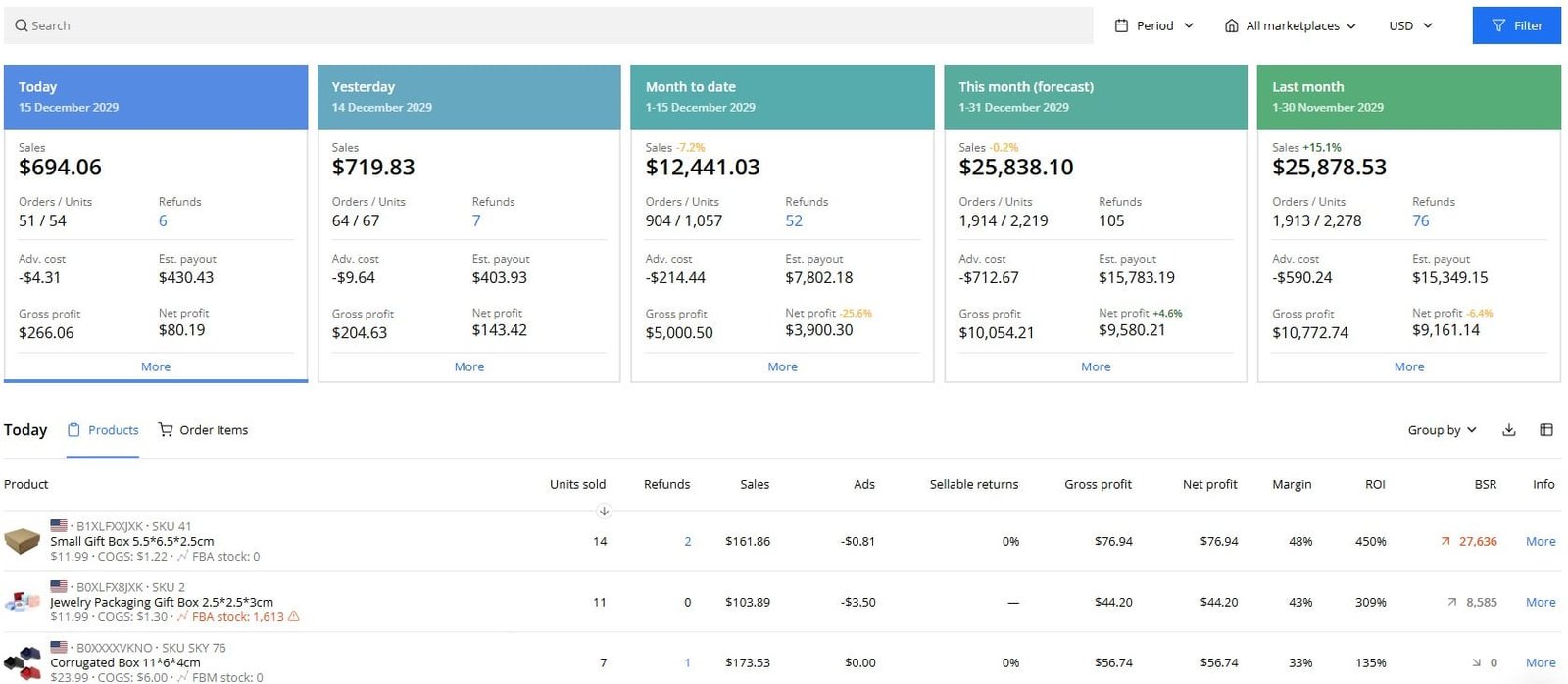
Ask any experienced Amazon seller what keeps them up at night, and profit tracking will almost always come up. Sales look healthy. PPC dashboards show solid click-through rates and conversions. Inventory keeps moving. Yet when the payout finally hits your bank account, the numbers never quite match what you expected to earn.
Amazon’s native reporting is notoriously fragmented. Advertising data lives in one dashboard. FBA fees are buried across multiple settlement reports. Refunds, reimbursements, storage fees, long-term storage penalties, and multi-currency conversions quietly erode margins in ways that are nearly impossible to track manually. For most sellers, “profit” ends up being an educated guess rather than a verified fact.
This is precisely the problem Sellerboard was built to solve.
In this comprehensive Sellerboard review, I’ll walk through exactly what the platform does, how accurate its data is, where it genuinely excels, where it falls short, how it compares to competitors, and—most importantly—who should and should not use it.
What Is Sellerboard? Sellerboard Review:
Sellerboard is a cloud-based Amazon profit tracking and analytics platform designed to calculate your true net profit—per product, per ASIN, per marketplace, and per day. Unlike broader Amazon tool suites that try to do everything (product research, keyword tracking, listing optimization), Sellerboard is deliberately focused on what happens after you start selling.
At its core, Sellerboard answers three questions that Amazon’s own tools cannot answer cleanly:
- How much money am I actually making after all fees, ads, and costs?
- Where exactly is my profit leaking—and why?
- What can I automate or optimize to protect and improve my margins?
FBA vs. FBM Sellers: Who Gets More Value?
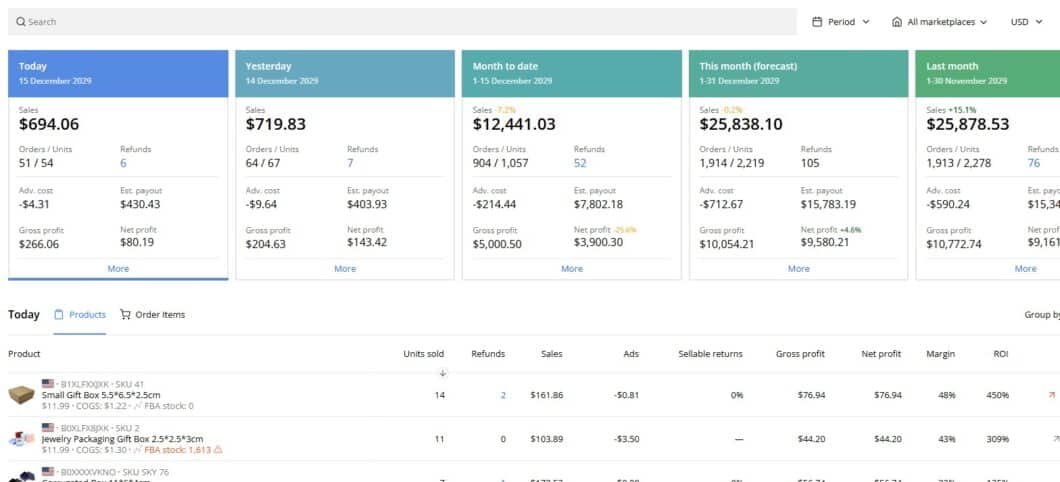
Sellerboard is clearly optimized for Fulfillment by Amazon (FBA) sellers. Its most powerful features—automated FBA fee tracking, reimbursement scanning, storage cost analysis, and inventory forecasting—are deeply tied to how FBA operates.
FBM (Fulfilled by Merchant) sellers can still use Sellerboard for profit tracking and PPC analysis, but the return on investment is noticeably lower without FBA’s complex fee structures to untangle. If your business relies on Amazon handling fulfillment, Sellerboard feels almost purpose-built for you.
Beginners vs. Intermediate and Advanced Sellers
It’s important to be upfront about this: Sellerboard is not a beginner-first tool. If you’re still validating your first product, running inconsistent monthly sales, or operating with very small ad budgets, Sellerboard will likely feel like overkill—and the cost may outweigh the value at that stage.
However, for intermediate to advanced sellers managing consistent volume, multiple SKUs, or cross-marketplace operations, Sellerboard becomes far more compelling. The complexity that makes it intimidating for beginners is exactly what makes it indispensable for scaling sellers.
💡 Expert Tip
Sellerboard tends to pay for itself most quickly for sellers who run PPC campaigns and have 3+ active ASINs. The PPC profitability insights alone often surface wasteful ad spend within the first week of use.
Core Sellerboard Features: An Honest, In-Depth Breakdown
Rather than listing every feature, this section focuses on the tools that actually matter for profit-focused Amazon sellers—how they work, how reliable they are, and where their limitations lie.
1. The Profit Dashboard: Sellerboard’s Foundation
The profit dashboard is the centerpiece of Sellerboard, and it’s where the platform earns its subscription fee for most users.
Sellerboard aggregates data from multiple Amazon data streams in near real-time, including:
- Amazon settlement reports
- Order-level transaction data
- Advertising costs from Sponsored Products, Brands, and Display
- FBA fees and referral fees per order
- Storage and long-term storage fees
- Refunds, returns, and Amazon-initiated reimbursements
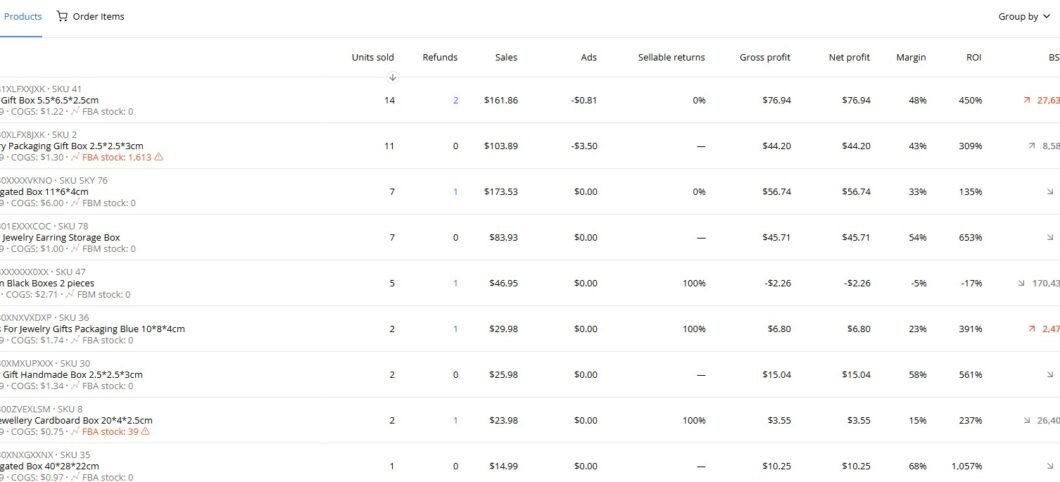
It then consolidates everything into a single net profit figure that updates daily. More importantly, it shows you not just what your profit is, but why it changed. You can filter results by product, ASIN, marketplace, date range, and advertising impact—making it much easier to diagnose margin issues than exporting CSVs and cross-referencing spreadsheets.
2. How Sellerboard Calculates Profit—And Why It Matters
Understanding the mechanics behind Sellerboard’s profit calculation is critical for evaluating how trustworthy its numbers actually are.
Sellerboard uses order-level profit calculation—not revenue estimates or averages. This means:
- Every sale is tracked individually, not in aggregate
- All associated FBA fees are applied to that specific order
- Advertising costs are attributed accurately to the relevant products
- Refunds are deducted at the order level, not estimated from averages
This approach matters enormously because Amazon margins are thin and unforgiving. A few percentage points lost to miscalculated fees or misattributed ad spend can turn a product that looks profitable into a quiet loser.
To ensure accuracy, Sellerboard allows you to input:
- Product cost (COGS) per unit
- Inbound shipping and prep costs
- VAT and applicable taxes
- Currency exchange rates for international marketplaces
Once configured properly, Sellerboard’s profit numbers become highly reliable. The key takeaway: Sellerboard doesn’t estimate—it reconciles. That distinction is what separates it from simpler trackers that work off Amazon’s settlement totals alone.
⚠️ Important Note
Sellerboard is only as accurate as the data you feed it. Incorrect COGS inputs, missing VAT adjustments, or outdated exchange rates will skew results. Plan to spend 1–2 hours on initial setup to ensure your numbers are trustworthy.
3. Sellerboard PPC Tools: Profit-Focused Ad Analysis
Amazon’s native advertising console shows you clicks, impressions, spend, and ACoS—but it can’t tell you whether your ads are actually making you money when all costs are factored in. Sellerboard closes that gap.
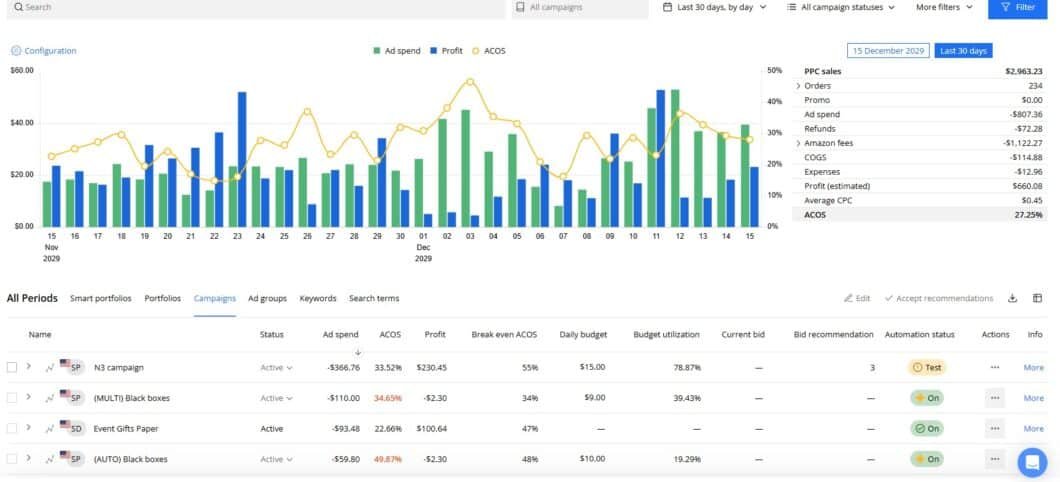
Instead of stopping at ACoS or ROAS, Sellerboard connects ad spend directly to net profit. Within the PPC analytics view, you can see:
- Net profit after ads for each campaign and ad group
- Profit contribution per keyword, not just conversion rate
- Campaigns and search terms that are draining margin despite appearing profitable in Amazon’s console
- Automated bid optimization rules based on profitability thresholds
- Alerts for unprofitable ads that need pausing or restructuring
For sellers running dozens or hundreds of campaigns, this makes prioritization dramatically faster. Instead of exporting ad reports and cross-referencing against profit data, you see the full picture in one place.
Limitations of Sellerboard’s PPC Features
Sellerboard’s PPC tools are excellent for profitability analysis, but they’re not a full replacement for dedicated PPC management software. Sellers who rely heavily on AI-driven bid automation, advanced bulk operations, or dayparting strategies will likely still want a dedicated tool like Perpetua, Scale Insights, or Pacvue alongside Sellerboard.
Think of Sellerboard’s PPC features as a financial lens on your campaigns—not a campaign management platform.
4. Inventory Management and Restock Forecasting
Inventory mistakes are among the most expensive errors an FBA seller can make. Overstocking ties up capital in warehouses and accumulates storage fees. Understocking kills organic rank and forfeits sales to competitors. Sellerboard’s inventory forecasting tool is designed to help you find the right balance.
The forecasting algorithm analyzes:
- Historical sales velocity per ASIN
- Supplier lead times (which you input manually)
- Seasonal demand patterns
- Current in-stock levels across fulfillment centers
It then produces clear restock recommendations: when to order, how much to order, and which SKUs are at risk of stockout. The interface doesn’t overwhelm you with graphs—it surfaces actionable suggestions in plain language.
Is the forecasting perfect? No tool is. Demand spikes, supply chain disruptions, and rapidly changing trends can outpace any model. But for day-to-day inventory management across a catalog of multiple SKUs, Sellerboard’s approach is practical and reliable enough to reduce both emergency reorders and excess stock situations.
5. The Sellerboard Reimbursement Tool: Does It Deliver?
This is one of Sellerboard’s most discussed features—and one of the most valuable for high-volume FBA sellers.
Amazon loses, damages, or miscounts inventory more often than most sellers realize. The company has processes to reimburse sellers for these errors, but identifying every eligible case manually is time-consuming and easy to miss.
Sellerboard automatically scans your account and flags potential reimbursement opportunities, including:
- Lost inbound shipments
- Warehouse-damaged inventory that wasn’t reimbursed
- Items destroyed without authorization
- Overcharged FBA fees due to incorrect product dimensions
- Customer refunds issued without inventory returned
In practice, sellers using Sellerboard’s reimbursement tool report recovering anywhere from a few hundred to several thousand dollars in missed reimbursements—funds that would otherwise have been silently absorbed as losses.
📌 Limitation to Note
Sellerboard identifies reimbursement opportunities but does not automatically file claims on your behalf. You still need to open cases through Amazon Seller Central. Some third-party reimbursement services handle this step for you (typically for a percentage cut), but Sellerboard’s value here is in surfacing the opportunities you’d otherwise miss.
6. Automated Email Follow-Up Sequences
Sellerboard includes a basic email follow-up tool for sending post-purchase review request sequences. This is a welcome addition for sellers who want to consolidate tools, though it’s worth noting that the email feature is simpler than dedicated review management tools.
It integrates with Amazon’s Buyer-Seller Messaging system and allows you to set up condition-based sequences (e.g., send a review request 7 days after delivery, skip if the order was refunded). For sellers who don’t want to pay for a separate email tool, this covers the essentials.
Sellerboard Pricing : Plans, Costs, and Value Analysis
Sellerboard’s pricing structure is based primarily on your monthly order volume, which makes sense for a profit tracking tool—the more orders you have, the more data Sellerboard processes on your behalf.
| Plan | Monthly Orders | Approx. Price/Month | Key Inclusions |
|---|---|---|---|
| Standard | Up to 3,000 | ~$19 | Profit dashboard, basic PPC, 1 marketplace |
| Professional | Up to 6,000 | ~$29 | All features, multiple marketplaces, reimbursements |
| Business | Up to 15,000 | ~$39 | Priority support, advanced analytics |
| Enterprise | Up to 50,000+ | ~$79+ | Full feature set, dedicated support |
Note: Prices listed are approximate and subject to change. Always check Sellerboard’s official website for current pricing. Annual billing typically offers a discount over monthly billing.
Is Sellerboard Worth the Cost?
Sellerboard delivers strong ROI under specific conditions. It tends to pay for itself when:
- You have consistent monthly sales volume (typically 100+ orders/month at minimum)
- You run PPC campaigns and want visibility into actual campaign profitability
- You operate on FBA and want to automate FBA fee reconciliation
- You have 3+ SKUs and need a centralized profitability view
If your business is in its early stages, seasonal, or primarily FBM, the cost-benefit calculation looks less favorable. The subscription fee is modest in absolute terms, but the value it provides scales directly with your order volume and operational complexity.
Sellers who use Sellerboard effectively often find it pays for itself through better ad decisions alone—identifying a few underperforming campaigns and reallocating that spend frequently covers the subscription fee within the first month.
How Real Amazon Sellers Actually Use Sellerboard Day-to-Day
Understanding features on paper is one thing. Seeing how they translate into daily workflows is another.
For most active users, Sellerboard becomes a morning ritual. A typical daily routine looks like this:
- Open the profit dashboard and review yesterday’s net profit vs. the previous 7-day average
- Check for any sudden margin drops that need investigation (fee changes, refund spikes, ad overspend)
- Review PPC performance for campaigns flagged as unprofitable or trending negative
- Check inventory alerts for any ASINs approaching stockout thresholds
- Review new reimbursement opportunities flagged by the system
This entire process typically takes 10–20 minutes with Sellerboard—versus 60–90 minutes of manual report pulling and spreadsheet work without it. That time savings compounds significantly across weeks and months.
💡 Power User Tip
Set up Sellerboard’s profit alerts to notify you by email when any ASIN’s net margin drops below a threshold you set (e.g., 15%). This turns Sellerboard into a passive watchdog that catches margin erosion before it becomes a major problem.
Sellerboard Pros and Cons: An Honest Assessment
✅ Strengths
- Highly accurate order-level profit tracking: Unlike tools that estimate from settlement totals, Sellerboard reconciles at the individual order level.
- Comprehensive fee visibility: FBA fees, referral fees, storage, and long-term storage are all tracked and attributed correctly.
- Profit-focused PPC analysis: Connects ad spend to actual net profit rather than stopping at ACoS.
- Automated reimbursement detection: Surfaces missed reimbursement opportunities that most sellers overlook.
- Clean, actionable dashboard: Information is organized to drive decisions, not just display data.
- Multi-marketplace support: Works across Amazon US, UK, EU, Canada, and other major marketplaces.
❌ Limitations
- Not beginner-friendly: Requires understanding of Amazon fee structures and meaningful sales volume to justify the cost.
- Setup investment required: Accurate profit data requires careful COGS and cost input. Garbage in, garbage out.
- No product research tools: Sellerboard is strictly a post-launch financial and operations tool. You’ll need a separate tool for keyword research, product discovery, and listing optimization.
- PPC automation is basic: Solid for analysis and simple rules, but doesn’t match the automation depth of dedicated PPC platforms.
- Reimbursements require manual filing: Sellerboard finds the opportunities; you still have to open the cases in Seller Central.
Sellerboard vs. Competitors: How Does It Stack Up?
Sellerboard vs. Helium 10
Helium 10 is the most popular all-in-one Amazon tool suite, with strong product research, keyword tracking, listing optimization, and basic profit analytics. Sellerboard is narrower but goes significantly deeper on the financial side.
| Feature | Sellerboard | Helium 10 |
|---|---|---|
| Profit Tracking Accuracy | ✅ Order-level reconciliation | ⚠️ Estimate-based (Profits tool) |
| PPC Profitability Analysis | ✅ Strong | ⚠️ Basic |
| Reimbursement Detection | ✅ Automated scanning | ⚠️ Manual / limited |
| Product Research | ❌ Not available | ✅ Industry-leading |
| Keyword Tracking | ❌ Not available | ✅ Comprehensive |
| Pricing (entry) | ~$19/month | ~$39/month |
| Best For | Post-launch profit control | Research + launch + optimization |
Many serious Amazon sellers use both tools: Helium 10 for research and optimization, Sellerboard for financial clarity. They serve genuinely different purposes, and using both in combination creates a complete operational stack.
Sellerboard vs. Jungle Scout
Jungle Scout’s core focus is product discovery and launch analytics. Its profit tracking capabilities exist but are secondary to its research features. Sellerboard focuses entirely on post-launch profitability and operations—making them complementary rather than competitive.
If you’re in the product research and launch phase, Jungle Scout serves you better. Once you’re selling consistently and want to optimize margins, Sellerboard becomes the more relevant tool.
Sellerboard vs. Other Profit Trackers (Fetcher, ManageByStats)
Compared to simpler Amazon profit trackers like Fetcher or the profit module within ManageByStats, Sellerboard offers more accurate order-level data, better reimbursement detection, stronger PPC integration, and more granular filtering. The trade-off is a slightly steeper learning curve and a higher price point—but for sellers who need reliable data, the accuracy difference is meaningful.
Ease of Use, Interface Design, and Learning Curve
Sellerboard’s interface is clean, logically organized, and data-focused. The designers have clearly prioritized function over form—every screen exists to surface information that helps you make better decisions, not to impress with visual flair.
That said, the learning curve is moderate. New users should expect to spend time:
- Inputting accurate COGS and cost data for each product
- Understanding how FBA fees are structured and categorized
- Setting up PPC rules and profit thresholds
- Configuring alerts and automated reports
Once the initial setup is complete, daily use is genuinely straightforward. Most experienced users get to a point where reviewing their Sellerboard dashboard takes 10–15 minutes and replaces hours of manual data work.
Customer Support and Onboarding Experience
Sellerboard’s support team is generally responsive and knowledgeable. The platform offers email support, a detailed knowledge base, and video tutorials covering the most common setup scenarios. Response times for support tickets are typically within 24 hours, with faster responses for higher-tier plans.
The onboarding experience is practical but not heavily hand-held. Sellers who are comfortable with Amazon’s fee structure and data exports will get up to speed quickly. Those newer to financial analytics may need more time to get the data inputs right and trust the output.
For sellers who want guided onboarding, Sellerboard also offers periodic webinars and a growing library of tutorial content. The community around the tool—through Amazon seller forums and Facebook groups—is also a useful resource for tips and troubleshooting.
Who Should Use Sellerboard—and Who Shouldn’t
✅ Sellerboard Is the Right Fit If You Are:
- An established FBA seller with consistent monthly order volume (100+ orders/month)
- Running PPC campaigns and want to connect ad spend to real net profit
- Managing multiple SKUs or multiple Amazon marketplaces
- Experiencing margin compression and need to diagnose where profit is leaking
- Tired of manually reconciling fees across multiple Amazon reports
- Looking to automate reimbursement tracking and reduce money left on the table
❌ Sellerboard Is Probably Not the Right Fit If You Are:
- A new seller still validating your first product with few or no consistent sales
- Primarily an FBM seller without complex fulfillment cost structures to track
- Looking for a product research or keyword tool—Sellerboard doesn’t offer this
- Unwilling to spend time on initial cost configuration and setup
- Operating a very small, part-time operation where the subscription cost outweighs the analytical value
Data Accuracy and Reporting: What to Expect
When configured correctly, Sellerboard is among the most accurate Amazon profit tracking solutions available. Its order-level reconciliation approach, combined with direct integration with Amazon’s data feeds, produces numbers that closely match actual financial reality.
Common accuracy pitfalls to watch for:
- Incorrect or outdated COGS entries—if your supplier raises prices, update Sellerboard immediately
- Missing VAT or tax adjustments for European marketplace sales
- Currency exchange rate discrepancies on multi-marketplace accounts
- Lag in Amazon’s data feed—some FBA fee data can take 24–48 hours to finalize
Sellerboard does include data validation warnings for common configuration issues, which helps catch errors before they compound into misleading reports. Treat your first two weeks on the platform as a calibration period—check a sample of individual orders against your own records to verify accuracy before relying on aggregate numbers.
Frequently Asked Questions About Sellerboard
Does Sellerboard offer a free trial?
Yes. Sellerboard typically offers a free trial period (usually 1 month) that gives you access to the full feature set. This is enough time to configure the platform, import your data, and evaluate whether the numbers are accurate for your account.
Does Sellerboard work for international Amazon marketplaces?
Yes. Sellerboard supports Amazon US, UK, Germany, France, Italy, Spain, Canada, Mexico, Japan, Australia, and other major marketplaces. Multi-currency accounts are supported, with exchange rate adjustments factored into profit calculations.
Can Sellerboard connect to multiple Amazon seller accounts?
Sellerboard supports multiple marketplace connections under a single account. If you operate separate seller accounts (e.g., a US account and a separate EU account), you may need separate Sellerboard subscriptions—confirm this with their support team for your specific setup.
How does Sellerboard handle Amazon reimbursements it finds?
Sellerboard identifies reimbursement opportunities and presents them to you within the platform. You then need to open support cases manually in Amazon Seller Central to claim the reimbursements. Sellerboard provides the evidence and case details needed to make a successful claim.
Is Sellerboard safe to connect to my Amazon account?
Sellerboard connects via Amazon’s official Selling Partner API (SP-API), the same secure connection method used by all legitimate Amazon tool integrations. Your account credentials are never shared with Sellerboard directly.
Does Sellerboard replace my accountant or accounting software?
No. Sellerboard is an operational profit tracker, not accounting software. It’s excellent for day-to-day margin management and business decisions, but it does not replace formal bookkeeping, tax reporting, or accounting tools like QuickBooks or A2X. Think of them as complementary: Sellerboard for operational clarity, accounting software for financial compliance.
Final Verdict: Is Sellerboard Worth It ?
If you’re serious about running your Amazon business with financial clarity rather than financial guesswork, Sellerboard is absolutely worth evaluating.
It doesn’t promise shortcuts, overnight success, or effortless scaling. What it offers instead is something more valuable: accurate numbers, fewer surprises, and better-informed decisions. For established FBA sellers who are tired of approximating profit and want to see—clearly and reliably—what’s actually happening in their business, Sellerboard delivers on its core promise.
The platform shines brightest when profitability matters more than vanity metrics. It’s designed for sellers who want to know exactly where their money is going, which ads are actually earning their keep, and where Amazon may owe them money they haven’t collected.
Where it falls short is equally predictable: it’s not a research tool, it’s not a beginner’s playground, and it rewards sellers who put in the time to configure it properly. Treat it as the financial control center it is, and it earns its place in your tech stack without question.
⭐ Bottom Line
Sellerboard is one of the most reliable Amazon profit tracking tools available. For FBA sellers managing consistent volume who want real financial clarity, it’s a strong, well-considered investment. Rating: 4.5/5
Related Resources for Amazon Sellers
If you found this review helpful, the following guides may also be relevant to your Amazon business:
- AMZScout Review: 15 Powerhouse Pros & 4 Critical Cons (A Seller’s Honest Take)
- 44 Websites to Make Money–$300 a Day Online
- How to Make Money on Amazon (6 Guaranteed Ways )
- The Best 32 Amazon Seller Tools You Should Try Today
Disclosure: This review reflects independent analysis. We may receive compensation if you sign up for Sellerboard through links on our site, which does not influence our assessment.